 ings
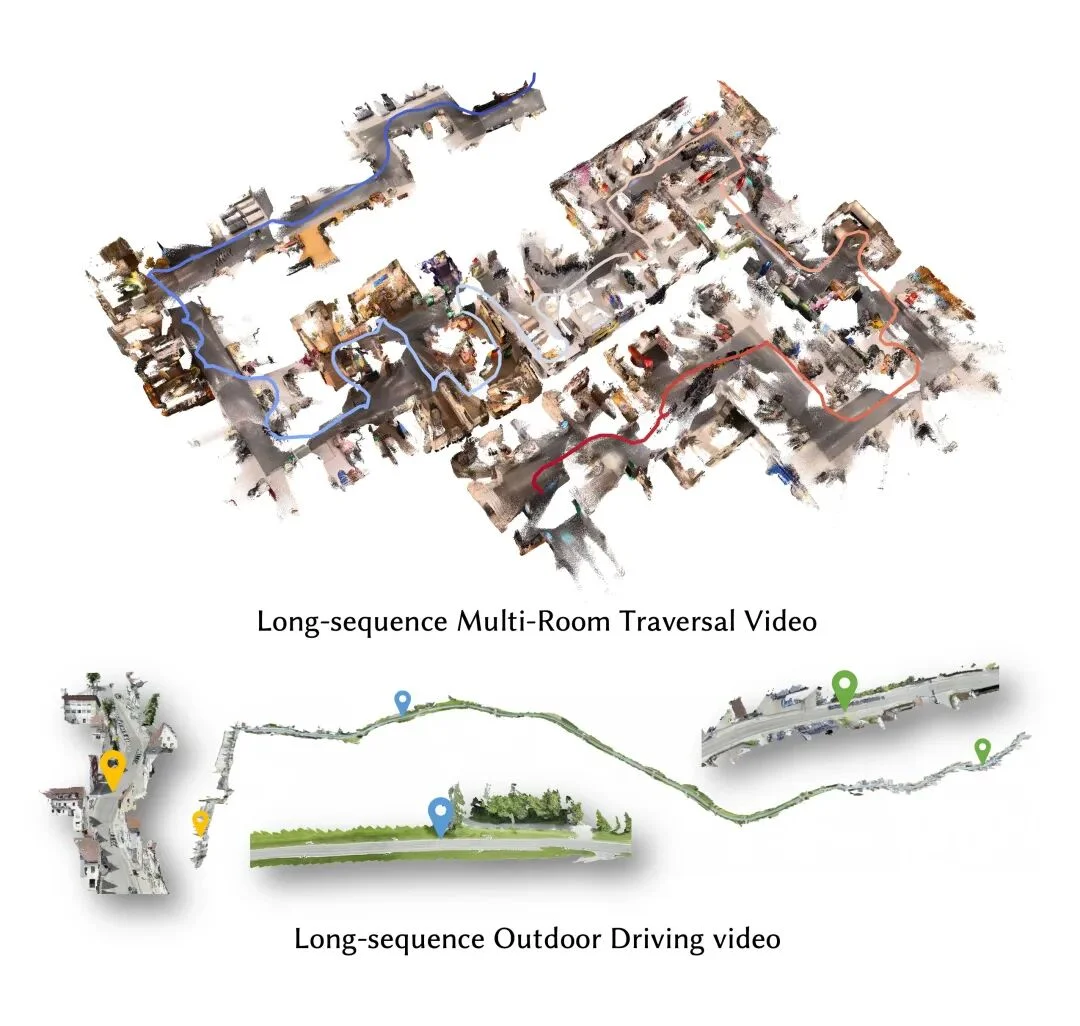
ingsIf you record a video while walking through rooms and hallways, can you reconstruct the space—seeing where the camera traveled and how objects are arranged?
LingBot-Map, an open-source project from the Robbyant team, offers a way to do this. Given a sequence of images, it estimates camera trajectories and scene geometry frame by frame, extending the 3D map as the video progresses.
To get started, follow three steps: run an example, try your own video, then move on to longer sequences.
First, follow the project installation instructions to set up CUDA, PyTorch, and the visualization dependencies, then download the model weights. Start with one of the included example scenes to check that your environment and model work before switching to your own footage.
For longer videos, the project provides the following command. Run it from the repository directory after installation, replacing the model and video paths with your own files:
python demo.py \
  --model_path /path/to/lingbot-map.pt \
  --video_path video.mp4 \
  --fps 10 \
  --mode windowed \
  --window_size 128 \
  --overlap_keyframes 16 \
  --keyframe_interval 2
Here, --fps 10 sets the video sampling rate. Once the demo is running, open http://localhost:8080 on the machine running it to inspect the reconstructed point cloud and camera trajectory from different viewpoints. See the interactive demo documentation for the available controls and options.
For videos lasting ten minutes or more, the challenge becomes controlling memory use and reducing trajectory drift while the map keeps growing.
LingBot-Map uses a Geometric Context Transformer to combine coordinate grounding, dense geometric cues, and long-range drift correction. A paged KV cache manages inference memory. According to the project's reported results, the model achieves approximately 20 FPS at a resolution of 518 × 378 and supports sequences exceeding 10,000 frames. Actual speed depends on your hardware and configuration.
The team also showcases an indoor walkthrough spanning approximately 25,000 frames and 13 minutes. That demonstration uses an offline rendering pipeline. To reproduce a similar result with a long video, follow the repository's batch-processing workflow, which requires additional rendering dependencies beyond the interactive demo.
For developers exploring robotic mapping, spatial perception, or digital twins, a short video is a practical first experiment. Check whether the reconstructed space is coherent and the camera trajectory remains stable, then gradually increase the video length.
The resulting point clouds and trajectories can serve as a foundation for spatial applications. Creating detailed, production-ready 3D assets still requires further processing.
Open-source project: Robbyant / LingBot-Map